

Chris Wood
Founder, qckfx
AI coding agents like Claude Code, Cursor, and Codex can build iOS UI faster than ever. They can write SwiftUI views, wire up navigation, even refactor entire screens. But they can't verify what they built actually works.
The missing piece is giving your agent eyes. A way to run the app, see what's on screen, and confirm the UI matches what was intended. Without this, you're stuck manually checking every change the agent makes, which defeats the point of using an agent in the first place.
This post compares the tools that let AI agents test iOS apps. Some are purpose-built for agents. Others work well enough. And one approach eliminates test code entirely, which turns out to be useful even if you're not using agents at all.
What to Look for in an iOS Testing Tool for AI Agents
Not every testing tool works well with AI agents. Here's what matters:
- MCP or API integration. Can the agent call the tool programmatically? MCP (Model Context Protocol) is becoming the standard way for agents to interact with external tools. If there's no integration, you're copy-pasting output manually.
- No test code required. Agents can write XCUITest code, but it's slow, verbose, and flaky. The best tools skip test code entirely.
- Deterministic and non-flaky. Agents can't debug timing issues. If a test fails randomly, the agent will waste tokens trying to fix code that isn't broken.
- Rich feedback. A simple pass/fail isn't enough. Agents need screenshots, logs, network timelines, and clear diffs to understand what changed.
- Local vs cloud. Cloud-based tools add latency, cost money, and sometimes raise privacy concerns. Local tools are faster and free.
iOS Testing Tools for AI Coding Agents Compared
| Tool | MCP | Test Code | Deterministic | Local/Cloud | Free |
|---|---|---|---|---|---|
| qckfx | Yes | No | Yes | Local | Yes |
| Arbigent | Yes | No (AI-driven) | No | Local | Open source |
| mabl | Yes | No | Partial | Cloud | No |
| testRigor | No | No (AI-driven) | No | Cloud | Trial |
| Maestro | No | YAML | No | Both | Open source |
qckfx
qckfx takes a different approach to iOS testing. Instead of writing test code, you record a simulator session by just using the app normally. qckfx captures every tap, scroll, and network response. Then it replays the session deterministically and diffs the screens visually.
How it works with AI agents: MCP integration lets Claude Code, Cursor, or Codex run tests directly. The agent says “run the login test” and gets back a pass/fail with screenshots showing exactly what changed.
Rich feedback for agents: Beyond screenshots, qckfx gives agents access to logs from the test run and a timeline of network requests. It highlights significant changes in network activity or timing between the current run and the baseline. This means when something breaks, the agent has real information to debug with, not just “test failed.”
Network determinism: All network traffic is recorded and replayed, so tests never flake due to slow APIs or changed server responses. This is the main reason tests become unreliable, and qckfx eliminates it entirely.
Works great without agents too: Even if you're not using AI coding agents, qckfx saves you from writing test code. Record your manual testing sessions once, then replay them as regression tests forever. No XCUITest, no selectors, no maintenance.
Current limitations: iOS only. Runs locally (CI support coming soon). You can't yet share test flows with your team, but this is in progress.
Arbigent
Arbigent is an open source project that uses AI in the loop to test mobile apps. Instead of following a scripted flow, the AI interprets your app's UI and navigates through it autonomously.
How it works: You define a goal, and the AI figures out how to get there by looking at the screen and deciding what to tap next. It automates test flow discovery, so you don't have to define every path yourself.
Strengths: You don't need to script test flows manually. Has a CLI and supports running tests in CI. Runs locally, no cloud device farm required.
Weaknesses: AI in the loop means every test run costs tokens, is slower than deterministic replay, and can be unreliable. The AI might take different paths on different runs, making failures hard to reproduce.
mabl
mabl is the enterprise option. It's a full test automation platform with AI features bolted on, including an MCP server for agent integration.
How it works: mabl can generate tests from user stories and has “agentic” capabilities for self-healing tests. It's the most mature option if you have budget and need enterprise features.
Strengths: Battle-tested at large companies. Good integrations. The MCP server means agents can trigger test runs.
Weaknesses: Expensive. Cloud-only, so you're paying for every test run. Overkill for solo devs or small teams. The AI features are additions to a traditional testing tool, not a ground-up rethink.
testRigor
testRigor lets you write tests in plain English. “Click the login button” instead of XCUITest code. It uses AI to interpret your instructions and navigate the app.
How it works: You describe test steps in natural language, and testRigor's AI figures out how to execute them on BrowserStack or LambdaTest devices.
Strengths: Low barrier to entry. Non-technical team members can write tests. Good for QA teams that don't want to write code.
Weaknesses: AI in the loop means tests are slow, expensive (token costs), and unreliable. No direct MCP integration, so agents can't call it natively. Cloud dependency adds latency and cost on top of the AI overhead.
Maestro
Maestro is a popular open source option for mobile UI testing. It uses YAML-based test flows and runs locally or in the cloud.
How it works: You write YAML files describing test flows, or record them from the app. Maestro executes the flows and reports results.
Strengths: Cross-platform (iOS and Android). Open source with an active community. You can commit test flows to your repo and share them with your team. This is the main advantage over qckfx right now.
Weaknesses: Flaky on complex flows due to timing issues. No MCP integration, so it's not built for AI agents. YAML test files still require maintenance when the UI changes.
Which Tool Should You Use?
If you're building iOS with Claude Code, Cursor, or Codex: qckfx. It's free, local, deterministic, and gives agents rich feedback including logs and network timelines. Purpose-built for the AI-agent workflow.
If you want to skip writing tests even without AI agents: qckfx. Record your manual testing sessions, replay them as regression tests. No test code to write or maintain.
If you need cross-platform or team test sharing: Maestro, for now. qckfx is adding team features, but Maestro has them today.
If you want automated flow discovery and don't mind AI-in-the-loop costs: Arbigent. Open source, runs locally, but slower and less deterministic than scripted approaches.
If you're an enterprise team with budget: mabl. The most mature enterprise option with good agent integration.
If you want plain English tests but don't need agent integration: testRigor. Easy for non-technical users, but not built for AI-first workflows.
How to Set Up qckfx with Claude Code
Install qckfx via Homebrew:
brew install qckfx/tap/qckfxLaunch qckfx, then click the menu bar icon and select Install MCP Server. Pick your agent from the list — Claude Code, Codex, or Cursor — and the MCP server is configured automatically.
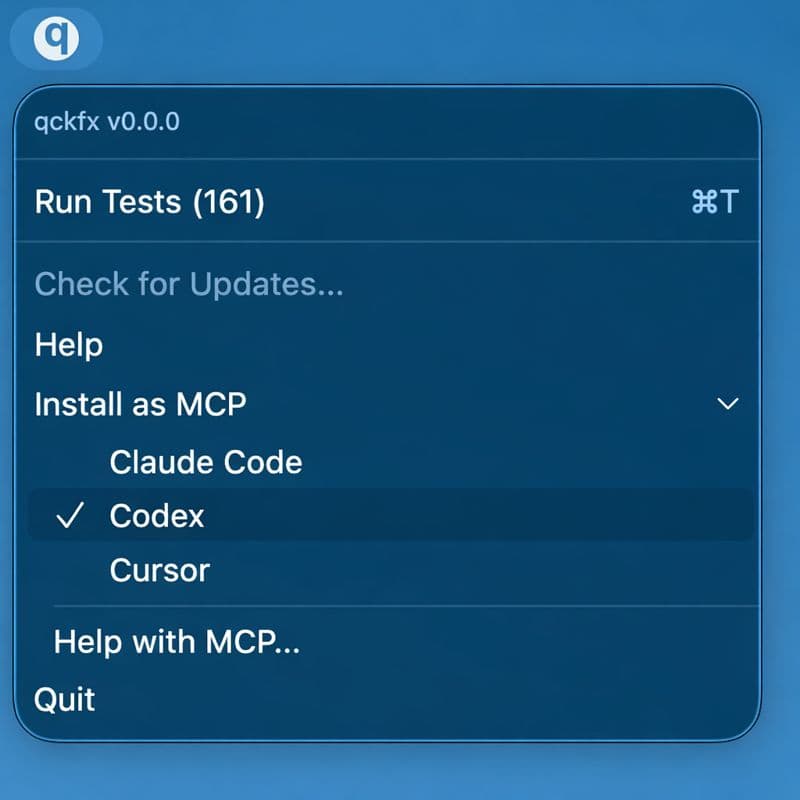
Your agent can now run your recorded tests directly. Ask it to “run the tests and show me what changed” after making UI modifications.
Conclusion
AI coding agents are changing how we build iOS apps, but verification is still the bottleneck. Most existing testing tools were built for humans writing test code. They assume you'll maintain selectors, handle timing issues, and debug flaky failures yourself.
The tools that work best with agents flip this around. They eliminate test code, guarantee determinism, and give agents the context they need to understand what went wrong.
qckfx is purpose-built for this workflow: record once, replay deterministically, let your agent verify its own work. And even if you're not using agents yet, it saves you from writing and maintaining test code entirely.
The future of iOS testing isn't writing more tests. It's recording what working software looks like and checking that it still looks that way.
It's free and runs locally. Give it a shot: qckfx.com