

Chris Wood
Founder, qckfx
AI coding agents can build iOS apps. Claude Code, Cursor, and Codex can write SwiftUI views, wire up navigation, fix build errors, and iterate on UI. The tooling has gotten remarkably good in the past year.
But there's a gap. These agents can write code and run it. What they can't do reliably is verify that what they built actually works.
The current approach is screenshots. The agent builds the app, takes a screenshot, looks at it, and tries to decide if the UI is correct. This works sometimes. It also burns tokens, gets stuck in loops, and fails in ways that are hard to debug.
This post breaks down the current tools for giving AI agents access to iOS Simulator, where they fall short, and what deterministic verification looks like.
The Current Tools
Two MCP servers dominate the iOS agent workflow right now.
XcodeBuildMCP
XcodeBuildMCP by Cameron Cooke is the most popular tool for connecting AI agents to Xcode. It handles the entire build-run-debug cycle:
- Build projects for simulator or device
- Manage simulators (boot, install, launch)
- Run tests
- Capture logs and build errors
- UI automation via the AXe library (tap, swipe, screenshots)
It works with Claude Code, Cursor, Codex, and any MCP-compatible client. XcodeBuildMCP is excellent at what it does. It gives agents hands. They can build, run, and interact with iOS apps without hallucinating xcodebuild flags or getting stuck on simulator management.
ios-simulator-mcp
ios-simulator-mcp by Joshua Yoes focuses specifically on simulator interaction:
- Tap, swipe, type text
- Describe accessibility elements
- Take screenshots and record video
- Install and launch apps
It's featured in Anthropic's Claude Code Best Practices documentation and is often used alongside XcodeBuildMCP. Where XcodeBuildMCP handles the build pipeline, ios-simulator-mcp handles fine-grained UI interaction.
Many iOS developers using AI agents run both.
The Verification Gap
Here's the workflow most developers describe when using these tools:
- Ask the agent to make a UI change
- Agent writes the code
- Agent builds with XcodeBuildMCP
- Agent takes a screenshot
- Agent looks at the screenshot and... decides if it's right?
Step 5 is where things break down.
The agent is interpreting a screenshot. It's guessing whether the UI matches what was intended. Sometimes it gets stuck, spending multiple rounds taking screenshots, trying to tap things, failing, and retrying. This burns tokens fast.
One developer building an iOS app with Claude Code described it this way: “There were many times that Claude would spend multiple rounds of taking screenshots, trying to click on things, and having it not work, rinse and repeat.”
The problem isn't the tools. XcodeBuildMCP and ios-simulator-mcp are excellent at giving agents interaction capabilities. The problem is that interaction isn't the same as verification.
Screenshots tell the agent what the UI looks like right now. They don't tell the agent whether the UI is correct. For that, you need a baseline to compare against.
What Agents Actually Need
Think about how a human developer verifies a UI change. They don't just look at the screen and decide it's probably fine. They compare it to what it looked like before. They check that existing functionality still works. They run the same flow multiple times to make sure it's consistent.
AI agents need the same thing, but automated and deterministic.
Deterministic is the key word. If you ask an agent to verify a UI by interpreting a screenshot, it might pass one run and fail the next, even if nothing changed. The agent's interpretation varies. Network responses vary. Timing varies. The whole thing becomes unreliable.
What agents need is:
- A recorded baseline of what “working” looks like
- Deterministic replay (same network responses, same timing, same everything)
- Visual diff that shows exactly what changed
- Pass/fail result the agent can act on without interpretation
This is the difference between giving an agent eyes and giving an agent judgment.
Deterministic Verification with qckfx
qckfx takes a different approach to iOS testing. Instead of asking the agent to interpret screenshots, it records a baseline of the app working correctly, then replays that baseline deterministically and diffs the results.
Here's how it works:
Recording: You use the app normally in the simulator. qckfx captures every tap, scroll, and network response. This becomes your baseline.
Replay: qckfx replays the session exactly. Network responses are stubbed with the recorded data. Timing is fixed. Non-deterministic elements (timestamps, UUIDs) are seeded. The replay is identical every time.
Verification: qckfx diffs the screens visually. If something changed, it shows exactly what. If nothing changed, the test passes.
Agent feedback: The agent gets a pass/fail result, plus screenshots showing the diff, logs from the test run, and a timeline of network requests highlighting any significant changes.
The agent doesn't have to interpret anything. It gets a definitive answer: the UI matches the baseline, or it doesn't, and here's exactly what's different.
Using XcodeBuildMCP and qckfx Together
These tools complement each other. XcodeBuildMCP handles the build and run. qckfx handles verification.
Here's what the workflow looks like:
- Agent makes a code change
- Agent builds with XcodeBuildMCP
- Agent runs qckfx tests
- qckfx returns pass/fail with visual diff and network timeline
- If tests fail, agent sees exactly what changed and can fix it
- If tests pass, agent knows the change didn't break existing functionality
The agent never has to guess. It gets deterministic feedback it can act on.
Setup
Install qckfx via Homebrew:
brew install qckfx/tap/qckfxLaunch qckfx, then click the menu bar icon and select Install MCP Server. Pick your agent — Claude Code, Codex, or Cursor — and the MCP server is configured automatically alongside XcodeBuildMCP or any other MCP servers you already have.
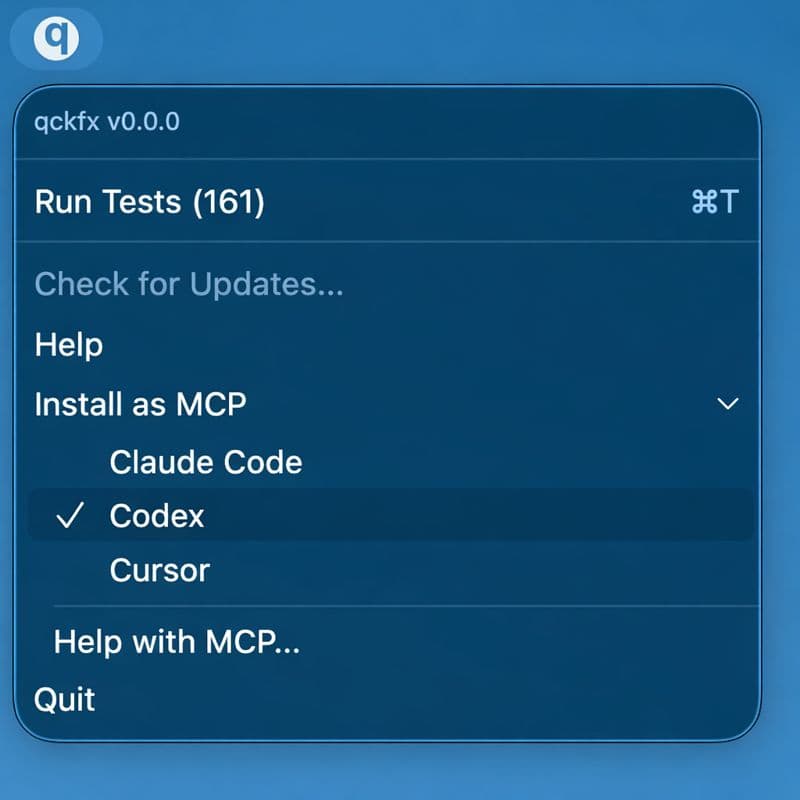
The agent can now build with XcodeBuildMCP and verify with qckfx.
Example Workflow
You: “Add a logout button to the settings screen.”
Agent:
- Writes the SwiftUI code for the logout button
- Builds with XcodeBuildMCP
- Runs qckfx tests
- Gets result: all tests pass, no visual regressions
- Reports: “Added logout button. Existing tests pass, no regressions.”
Or if something breaks:
- Writes the code
- Builds
- Runs qckfx tests
- Gets result: login flow test failed, visual diff shows the tab bar is now hidden
- Reports: “The logout button change accidentally hid the tab bar. Here's the diff. Fixing now.”
The agent catches the regression immediately, without burning tokens on screenshot interpretation loops.
The Feedback Loop Problem
The real issue with current iOS agent workflows isn't the tools. It's the feedback loop.
AI agents work best when they can process the result of their changes directly. For a CLI tool, that's text output. For a web app, that might be a test runner. For iOS, the feedback loop has been broken: the agent makes a change, but has no reliable way to know if it worked.
Screenshots are a workaround, not a solution. They require the agent to interpret visual information, which is slow, expensive, and unreliable.
Deterministic verification fixes the feedback loop. The agent makes a change, runs a test, and gets a definitive result. No interpretation. No guessing. No token-burning loops.
Conclusion
XcodeBuildMCP and ios-simulator-mcp are great tools. They give AI agents hands: the ability to build, run, and interact with iOS apps. This was the first step toward AI-driven iOS development, and these tools have made it possible.
What's been missing is judgment: the ability for agents to verify their own work reliably.
That requires deterministic verification. Record what working looks like. Replay it exactly. Diff the results. Give the agent a pass/fail it can act on.
qckfx closes this loop. Combined with XcodeBuildMCP for building and running, it gives agents the full cycle: write code, build, verify, iterate.
The future of iOS development isn't agents that can build apps. It's agents that can build apps and know they work.
It's free and runs locally. Give it a shot: qckfx.com