
For AI-Assisted iOS Development
Your coding agent accidentally broke your app, again.
It can't see the UI. It's too slow.
It doesn't know what "right" looks like.
qckfx gives your agent eyes. Fast, reliable UI verification.
For AI-Assisted iOS Development
Your coding agent accidentally broke your app, again.
It can't see the UI.
It's too slow.
It doesn't know what "right" looks like.
qckfx gives your agent eyes. Fast, reliable UI verification.
Sound familiar?
You've tried running builds after each change, but that's slow and doesn't catch visual bugs.
You gave the agent access to the simulator, but it takes forever and still doesn't catch everything.
You're tired of playing QA for your agent, clicking around after every change.
How it works with AI agents
Record once.
Click through your flows in the simulator. qckfx captures every tap, scroll, screen, and network response.
Agent makes changes.
Let Claude Code, Codex, or Cursor refactor, add features, or fix bugs.
Agent runs your flows.
Your agent triggers qckfx to replay your recorded flows and compare screenshots.
Catch regressions instantly.
qckfx reports any visual differences. Your agent can fix them or flag for review.
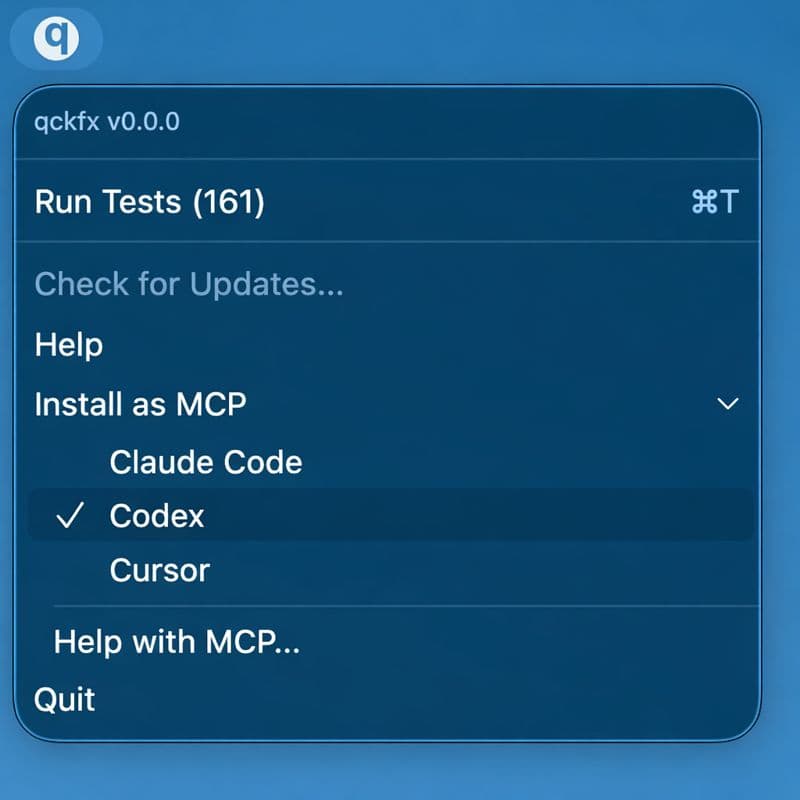
One-click setup for your favorite agent
Install the qckfx MCP directly into Claude Code, Codex, Cursor, or any other coding agent that supports MCP. Just one click.
No config files. No terminal commands.
Built for individual developers.
Free, no account required, no code to commit.
Tests live in qckfx, not your repo.